Sign Up
Sign up for IndexMind with Google, email plus a one-time code, or an optional password. Then choose a FREE, STARTER, PRO, ULTRA, or ENTERPRISE plan.
You can create an IndexMind account with Google, with email and a one-time passcode (OTP), or with an optional password so later sign-ins skip the code.
Prerequisites
Before you begin, make sure you have:
- A valid email address you can access immediately (OTP codes expire after a few minutes)
- A modern browser such as Chrome, Firefox, Safari, or Edge
Create your account
- 1
Open IndexMind
Go to www.indexmind.ai and choose Sign Up in the top-right corner, or open /signup directly.
- 2
Choose Google or email
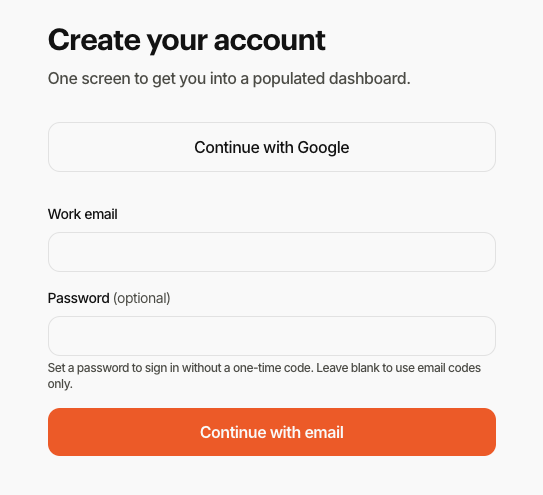
Continue with Google signs you in with your Google account. Or enter your work email. You can set a password on this screen if you want password sign-in later. Leave the password blank to use email codes only.
- 3
Verify with a one-time code when asked
If you did not set a password, IndexMind emails an 8-digit one-time passcode. Enter it on the next screen. Check spam if it does not arrive within a minute.
- 4
Choose a plan
Select the plan that fits your needs. Customer-facing tiers are FREE, STARTER, PRO, ULTRA, and ENTERPRISE (contact sales). You can change plans later from billing settings.
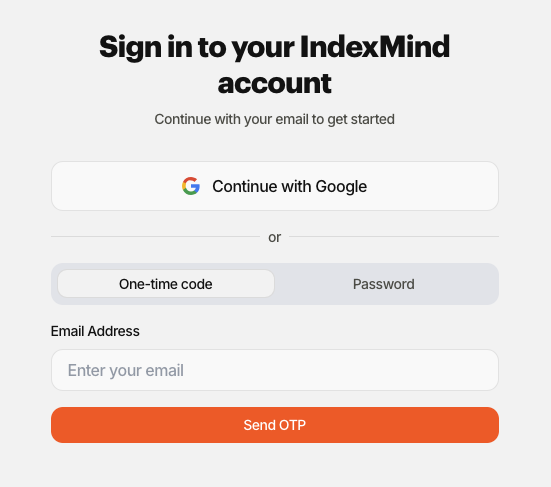
Already have an account? Sign in at /login. Use One-time code or the Password tab, or continue with Google.
Compare plans
Visit the Pricing page for a current feature comparison across FREE, STARTER, PRO, ULTRA, and ENTERPRISE.