Run Your First Analysis
Run your first IndexMind analysis combining crawl, AI probes, and scoring, then read your overall score, pillar breakdown, and Overview tabs.
An IndexMind analysis evaluates your website's AI visibility. It combines three stages:
- Crawl: Discover pages, extract content, and map site architecture.
- Probes: Test how large language models and AI assistants interpret, summarize, and recommend your content.
- Scoring: Produce your AI Optimization Score, visibility and citation signals, sentiment, and an overall score.
Starting an analysis
- 1
Open Overview
After you create a project you land on Overview. You can also pick the project from Projects and open the Overview tab.
- 2
Run full analysis
Click Run full analysis. The run continues in the background. Stay on the page to watch the ribbon, or leave and come back. When the run finishes, STARTER and above can see a Generate Fixes handoff if that feature is enabled for the org.

The ribbon shows pipeline stages: Crawl, Probe, Narrative, and Report. Typical runtime is 5 to 15 minutes, longer for large sites.
Understanding the results
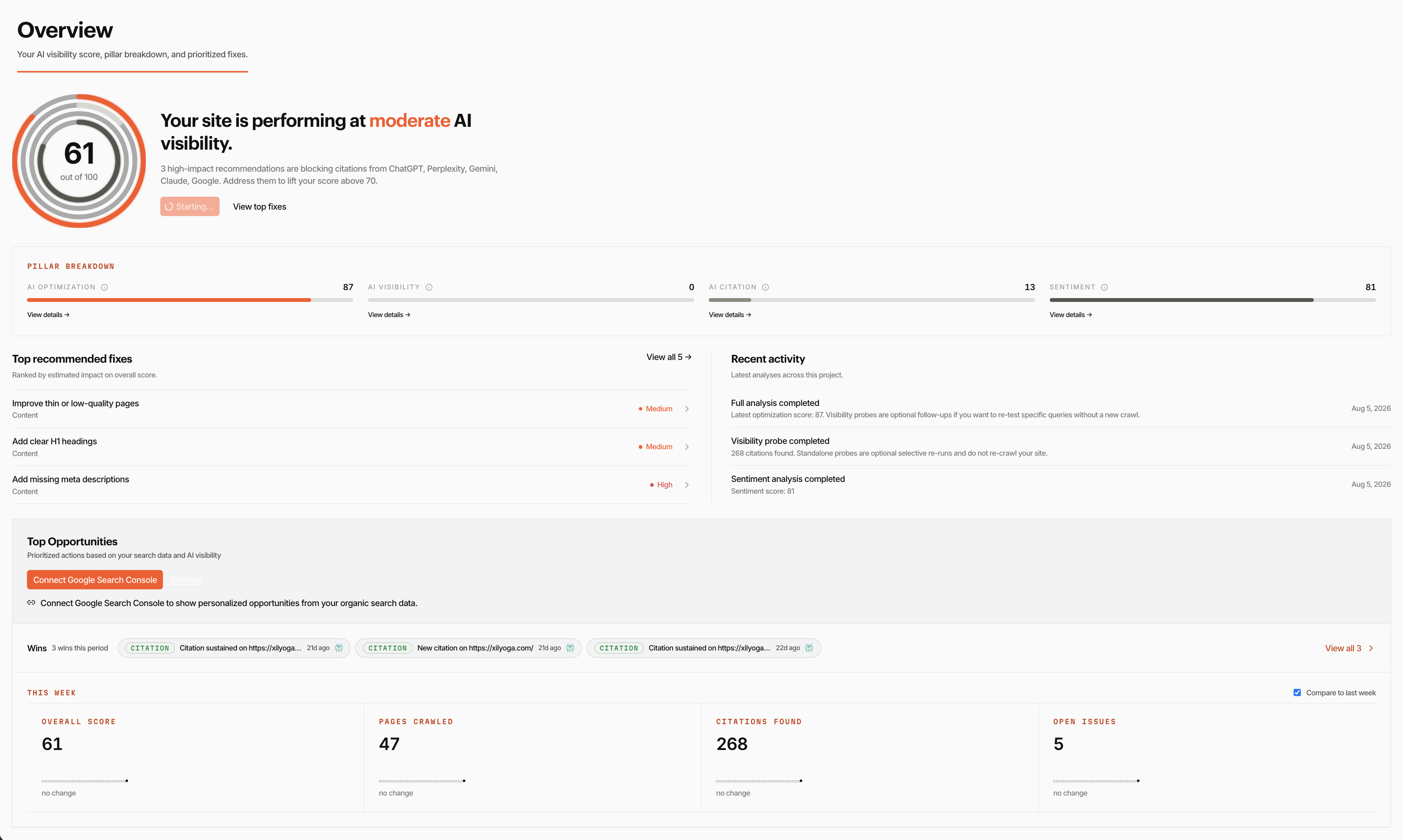
Once the analysis finishes, Overview updates with scores and prioritized fixes.
Overall score
Overview leads with an overall score from 0 to 100. It is a weighted composite: 40% AI Optimization, 30% visibility and citation coverage (those two scores averaged into one dimension), and 30% sentiment. Missing dimensions drop out of the mix, so a brand-new project is scored on the dimensions that exist.
AI Optimization Score
Your AI Optimization Score measures how well your website is built for AI discovery. It is composed of four pillars:
| Pillar | What it measures |
|---|---|
| Content Quality | How well your content is written, structured, and aligned with topics AI models associate with your domain. |
| Conversion Experience | Whether your site provides clear calls to action, trust signals, and a journey AI systems can recognize. |
| Info Architecture | How pages are organized, linked, and labeled so AI crawlers can navigate them. |
| Technical Health | Performance, schema markup, accessibility, and other technical factors that affect discoverability. |
Exploring the tabs
The project strip organizes work across these tabs (some are plan- or project-gated):
- Overview: Overall score, pillar breakdown, crawl status, and prioritized fixes.
- AI Optimization: On-site issues and fixes that move the AI Optimization Score.
- AI Visibility: Probe results plus Search Intelligence surfaces (search performance, content gaps, cohort tracking, URL health) when Google Search Console is connected.
- Sentiment: How AI outputs characterize your brand.
- Local: Local AI visibility for projects with a local or hybrid audience (when the Local tab is enabled).
- Commerce: Catalogue and commerce signals for Ecommerce site types.
- Competitor Analysis: Side-by-side AI visibility against competitors.
- Content Strategy: Tracked keywords, prompts, and content planning.
- Data: Crawls, Analytics, and Reports as sub-views.
- Settings: Project configuration, including Google Search Console and MCP / IDE keys.
When Google Search Console is connected, AI Visibility also surfaces Search Performance, Content Gaps, Cohort Tracking, and URL Health.
Next steps
- Core Concepts: Scoring model, probe types, and how IndexMind evaluates AI visibility.
- Search Intelligence: Connect Google Search Console for organic and AI cross-analysis.
- Configure Bob: Guardrails, schedule, and how Bob proposes fixes.
- MCP Integration: Connect IndexMind to your IDE.
Your first analysis may take a few minutes depending on site size. Watch progress on Overview. Do not start a second full analysis while the ribbon is still running.