What is Bob?
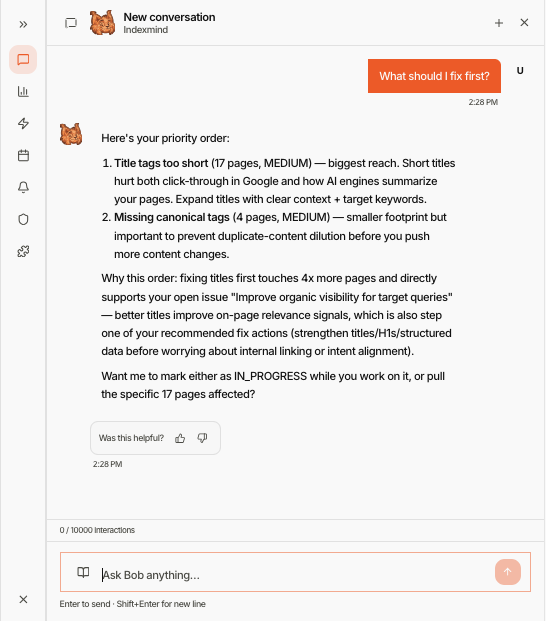
Bob is IndexMind's in-product AI SEO advisor. He monitors AI visibility, answers questions, proposes fixes, and can execute work inside your guardrails.
Bob is an AI SEO advisor built into IndexMind. He monitors your site's AI visibility, answers questions in plain language, proposes concrete improvements, and, when you allow it, executes work inside the guardrails you set.
Bob uses IndexMind crawl data, probe results, and scores so answers stay grounded in your project.
What Bob can do
- Analyze your site: Review crawl results, scores, and competitor data to surface high-impact work.
- Answer questions: Ask about AI visibility, technical health, content quality, or competitive position.
- Propose improvements: Schema, content gaps, and technical issues as structured items you can review.
- Execute within guardrails: On paid plans, Bob can run allowed action types (for example webhooks, or GitHub Actions on ULTRA and ENTERPRISE) after you set autonomy and risk profile.
Prerequisites
- An active IndexMind project
- A plan tier that matches the autonomy you want (FREE stays advisory)
How to access Bob
Open Bob from the header Bob button, the floating Bob control, or /app/agent. The sidebar includes:
- Chat: Conversational interface
- Prompts: Prompt library for this project
- Analysis: Findings across the project
- Action Plan: Review, approve, or dismiss proposed actions
- Schedule: When Bob runs automated analyses
- Notifications: Alert preferences
- Guardrails: Risk profile, approval rules, and protected pages
- Integrations: Route actions to connected tools
Capabilities depend on plan and autonomy level. On FREE, Bob stays in advisory mode. STARTER and above add proposed actions and automation you configure.
Learn more
Autonomy Levels
Control how much independence Bob has, from observe-only to auto-execute.
Risk Profiles
Set Bob's confidence threshold for surfacing and executing actions.
Configuration
Configure schedules, notifications, guardrails, and integrations.
Per-Project Behavior
Understand how Bob works across multiple projects in your organization.